
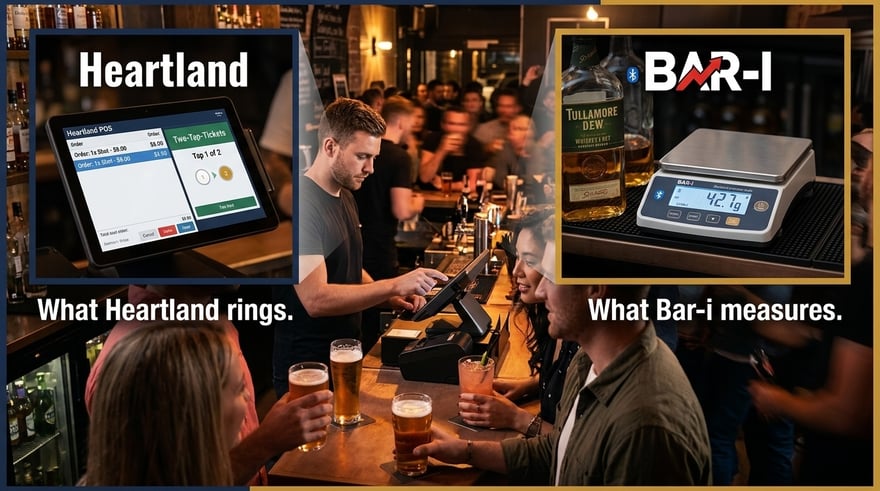
“Heartland captures every Two-Tap order, every tokenized tab, every pre-authorized transaction. Bar-i measures what those transactions consumed — down to the tenth of an ounce, per product, every count period. ”
Heartland POS — operated by Global Payments, one of the largest payment technology companies in the world — is one of the most widely deployed POS platforms across independent bars and multi-location restaurant groups in the United States. Its bar-specific design is visible in how it handles the practical realities of busy bar service: Two-Tap-Tickets for high-velocity single-item orders, EMV chip card tab management with incremental authorization, and real-time mobile reporting through the Heartland Mobile Manager app.
That tab management reliability matters for Bar-i, because the quality of an accountability score depends first on the completeness of what was rung. In high-volume bar environments, ringing friction — too many taps, too many steps — is the primary reason transactions get skipped during a rush. Heartland's Two-Tap-Tickets removes that friction for the most common bar orders, which means the Product Mix / Item Sales Report Bar-i imports start from a more complete sales baseline.
Bar-i closes the measurement gap that Heartland cannot fill: what was actually poured. By connecting Heartland's itemized sales data to Bar-i's precision physical inventory system — 0.1 oz Bluetooth scales, barcode scanning, Speed Count at up to 500 items per hour — every rung sale becomes a recipe deduction, and every pour becomes accountable.
Does Bar-i integrate with Heartland POS? Yes. Bar-i integrates with Heartland POS by importing the Product Mix / Item Sales Report — filtered to your bar revenue center — and comparing it against physical bar counts conducted with Bar-i's Speed Count system (up to 500 items/hour, 0.1 oz precision on open bottles). The result is a product-level accountability score and dollar-quantified variance report delivered weekly by your dedicated Bar-i account manager.
Why This Integration Matters
Heartland's placement within Global Payments gives it payment-grade transaction reliability — the same infrastructure used to process billions of dollars in hospitality payments annually. That reliability extends to how Heartland handles bar-specific transaction scenarios: tabs opened on tokenized cards, incremental authorizations added mid-service, and walk-out recoveries applied after the fact. These are transactions that get lost in less sophisticated POS systems but are captured and reported in Heartland's Product Mix data.
The feature that matters most for high-volume bars is Two-Tap-Tickets. When a bartender is handling a four-deep rush, and someone orders a shot of Jameson, the difference between a two-tap ring and a five-tap ring is whether that transaction happens at all. Bar-i's accountability math only works when the sales denominator is complete. Two-Tap-Tickets is Heartland's answer to the ringing problem that high-volume bar service creates.
The result is a Product Mix / Item Sales Report that is more complete than what most POS systems generate in a busy bar environment. When Bar-i imports that data and applies it against physical Speed Count measurements, the accountability scores reflect actual operational reality rather than a baseline contaminated by missed rings.
What Is Heartland POS?
Heartland POS is a restaurant and bar point-of-sale platform operated by Global Payments — one of the largest payment technology and financial services companies in the world, serving hundreds of thousands of merchants across North America. Heartland Restaurant is its purpose-built hospitality product, designed for bars, full-service restaurants, and multi-location groups that need reliable tab management and detailed sales reporting.
Key Heartland features relevant to bar accountability:
- Two-Tap-Tickets — processes single-item orders in two taps (item + checkout), reducing ringing friction for high-volume bar service
- EMV chip card pre-authorization for tabs — chip cards can run a full tab, not just tap-and-go payments
- Token storage — cards are tokenized at first swipe, allowing tabs to run without the physical card present throughout the night
- Incremental authorization — automatically adds funds when a tab total exceeds the original pre-authorization amount
- Walk-out protection — bartenders can close an open tab to a pre-authorized card plus 20% tip if a guest leaves without settling
- Product Mix / Item Sales Report — every menu item sold by quantity, exportable by revenue center and date range
- Heartland Mobile Manager — real-time mobile reporting app, accessible from any device for on-the-go sales visibility
- Revenue center reporting — bar, dining room, and other zones tracked separately for clean data separation
Heartland's Product Mix / Item Sales Report — exported by bar revenue center — is the data source Bar-i imports for accountability calculation. The completeness of that report depends directly on how well your bar staff uses Heartland's tab features during service.
How the Bar-i Integration Works
Step 1 — Conduct Speed Count Inventory
Bar-i's Speed Count system (mobile app + Bluetooth precision scale + barcode scanner) processes your full bar inventory at up to 500 items per hour. Every open bottle is measured to 0.1 oz — no visual estimates, no guessing.
Step 2 — Export Heartland Product Mix / Item Sales Report
Export the Product Mix / Item Sales Report from Heartland's back-office reporting portal for the count period. Filter to your bar revenue center to isolate bar sales from dining room and kitchen data. This report shows every menu item sold at the bar by quantity and price. Heartland allows flexible date-range filtering and report export as PDF or Excel.
Step 3 — Map Recipes and Import
Upload the Heartland data to Bar-i. Bar-i's account team maps every Heartland menu item — including significant modifiers — to a recipe with exact pour sizes and ingredient ratios. This mapping converts a list of item quantities into a precise expectation of how much product should have been consumed during the count period.
Step 4 — Receive Weekly Accountability Report
Bar-i calculates Expected Consumption (Heartland sales x recipe portions) versus Actual Consumption (physical count variance). Your accountability score per product, dollar variance, trend data, and written recommendations arrive weekly from your dedicated account manager.
The Accountability Formula
Bar-i Accountability Formula
Expected Consumption = Sales Units × Recipe Pour Size (oz)
Actual Consumption = Opening Inventory + Purchases − Closing Inventory (oz)
Accountability Score = Expected ÷ Actual × 100%
Dollar Variance = (Actual − Expected) × Current Wholesale Cost Per Unit
A 95% accountability score means 5% of the poured product was not rung up in Heartland — lost to waste, over-pouring, or theft. Bar-i quantifies that 5% in exact dollars.
Key Features
Speed Count — Up to 500 Items Per Hour
Traditional manual bar inventory averages 80–120 items per hour. Bar-i’s Speed Count system processes up to 500, reducing a full count for a 300-SKU bar from 3+ hours to under 45 minutes. That is a count your team will actually complete consistently, on schedule, every period.
|
Pro Tip — Configure Heartland Revenue Centers Before Bar-i Setup Heartland’s revenue center system separates bar sales from dining room and kitchen data in the Product Mix report. Before Bar-i integration begins, verify that all bar-side menu items are assigned to a dedicated bar revenue center in Heartland. This single configuration step ensures Bar-i receives clean, bar-only sales data and allows Bar-i to calculate beverage cost on specific profit centers and run accurate variance analysis. |
0.1 oz Precision on Open Bottles
Visual estimation of partial bottles is the largest source of inaccuracy in traditional bar inventory. Bar-i's Bluetooth precision scales eliminate estimation entirely. Every open bottle is measured to one-tenth of an ounce. At scale, across hundreds of bottles and dozens of count periods, that precision difference is what makes product-level accountability scores reliable rather than approximate.
Level 3 Analysis — Every SKU, Every Count Period
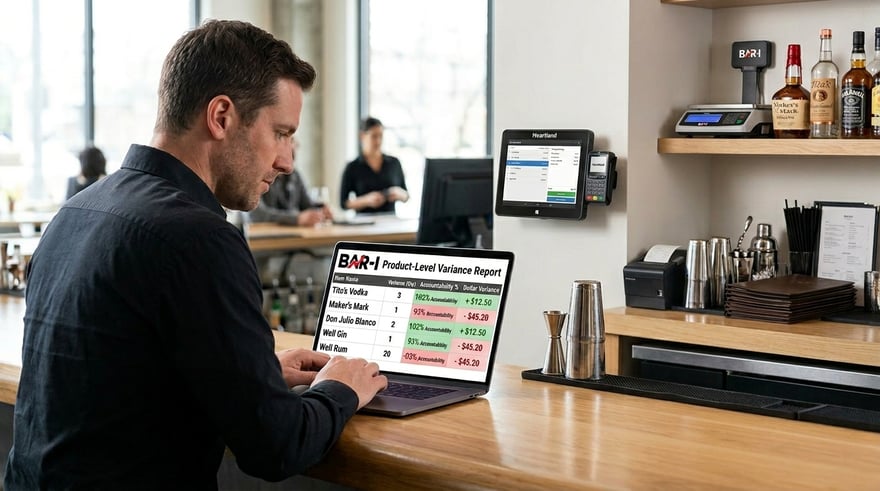
Bar-i's Level 3 accountability framework reconciles Heartland's Product Mix data against physical counts at the individual product level. For every SKU in your bar, Bar-i calculates exactly how many ounces were expected versus how many were actually consumed — and expresses that gap as both a percentage accountability score and a dollar variance. If your Tito's is running 11% over-pour and your well bourbon shows $280 in monthly variance, Bar-i surfaces that data by product, every count cycle.
Dedicated Account Manager
Your Bar-i account manager handles Heartland Product Mix recipe mapping, invoice reconciliation, and weekly written analysis — delivering professional-grade insights without requiring an internal analyst. They know your bar, your Heartland menu structure, and your variance patterns.
Achievable vs. Actual Liquor Cost
Bar-i calculates what your liquor cost should be based on Heartland's Product Mix data and your mapped recipes. That achievable liquor cost versus your actual liquor cost shows exactly how much margin is being lost to accountability failures — and how much you can realistically recover.
Multi-Location Heartland Support
Running multiple venues on Heartland? Bar-i manages each location with individual accountability reports. Each venue's Product Mix data is analyzed separately, and results are accessible under your Bar-i account. Identify your best and worst-performing venues with consistent, comparable data across the group.
Real Results: What Bar-i Clients Achieve
|
Metric |
Industry Average (No System) |
Bar-i Clients |
|
Bar Shrinkage Rate |
15–20% of gross bar revenue |
As low as 2% |
|
Liquor Cost Reduction |
— |
3 percentage points average. |
|
Bar Profit Improvement |
Baseline |
Average +30% |
|
Count Speed |
80–120 items/hr |
Up to 500 items/hr |
|
Accountability Score |
80–85% (industry baseline) |
95%+ consistently |
Monthly ROI Example — $50,000/Month Bar on Heartland:
$50,000 × 20% beverage cost = $10,000 monthly product cost
$10,000 × 15% shrinkage = $1,500/month in untracked losses
Bar-i reduces shrinkage by approximately. two-thirds → $1,000/month recovered
$1,000 × 2 (conservative recovery multiplier) = $2,000/month bottom-line improvement
Annual improvement: $24,000 | Bar-i bi-weekly service cost: $5,400/year
Net annual gain: $18,600 — approximately 340% ROI
Who Should Use This Integration?
- High-volume bars on Heartland where Two-Tap-Tickets is actively used — fast service means more rings, more complete data for Bar-i
- Bars and restaurants in Heartland are generating $25,000+ in monthly bar sales
- Operators who suspect shrinkage but cannot identify which specific products are responsible
- Heartland users who want to turn Product Mix / Item Sales Report data into per-SKU accountability scores
- Multi-location restaurant groups in the Heartland that need consistent, comparable accountability data across venues
- Owners whose actual liquor cost consistently exceeds what the Heartland sales data says it should be
Pro Tips for Bar-i + Heartland POS
|
Pro Tip #1 — Enable Two-Tap-Tickets for Your Highest-Volume Bar Items Heartland's Two-Tap-Tickets feature is designed for single-item bar orders — shots, bottled beers, simple drinks — that a bartender should be able to ring in under two seconds. If this feature is not enabled or configured for your most common bar items, you are likely losing transactions during peak service. A skipped ring is an accountability gap before Bar-i even starts counting. Work with your Heartland rep to configure Two-Tap-Tickets for your top 10 high-velocity items. |
|
Pro Tip #2 —Configure Heartland Revenue Centers Before Bar-i Integration Heartland’s Product Mix report can be filtered by revenue center when exporting. Before Bar-i setup, verify that every bar-side menu item is assigned to a dedicated bar revenue center — separate from dining room and kitchen items. This configuration takes less than an hour in Heartland’s back office and directly determines whether Bar-i receives clean bar-only data. Correct revenue center setup allows Bar-i to calculate beverage cost on specific profit centers and run accurate variance analysis. |
|
Pro Tip #3 — Count Before Deliveries, Not After Always run your Bar-i inventory count before supplier deliveries arrive for that period. Counting after a delivery requires accounting for new stock mid-period — introducing complexity and opportunities for error. Schedule your count day to consistently precede your primary delivery day so opening and closing inventory figures are clean and unambiguous. |
|
Pro Tip #4 — Reconcile Open Tabs Before Exporting Product Mix Data Heartland's Product Mix report reflects closed transactions. If there are open tabs from the count period — cards that were pre-authorized but never formally closed — those items may not appear in the export. Before pulling data for Bar-i, use Heartland's tab management view to confirm all tabs from the period are closed. Walk-out protection and incremental authorization minimize this risk, but a quick pre-export check ensures a complete count. |
|
Pro Tip #5 — Share Accountability Scores with Bar Managers Weekly Bar-i data is most effective when the bar manager sees it every week — not just ownership. When managers see their team's accountability score and variance by product, behavior changes. Heartland's Mobile Manager already gives bar managers real-time sales visibility — Bar-i adds the physical measurement layer that completes the picture. Visibility creates accountability without confrontation. |
Frequently Asked Questions
Q: Which Heartland report does Bar-i use for accountability calculation?
Bar-i imports Heartland's Product Mix / Item Sales Report, exported from Heartland's back-office reporting portal, and filtered to your bar revenue center. This report shows every menu item sold by quantity for the selected date range. Bar-i's account team guides the export process and verifies data completeness before running accountability calculations.
Q: What are Two-Tap-Tickets, and why does it matter for Bar-i?
Two-Tap-Tickets is a Heartland POS feature that allows bartenders to process single-item orders in exactly two taps — one tap for the item, one for checkout. In high-volume bar environments, this reduces ringing friction on quick orders like shots and bottled beers. For Bar-i, more complete ringing means a more accurate sales baseline — and more accurate accountability scores.
Q: Does Bar-i work with Heartland POS modifiers?
Yes. Bar-i's recipe mapping accounts for Heartland modifiers — double pours, premium substitutions, and other items that change the ingredient volume of a drink. Accurate modifier mapping is what allows Bar-i to generate product-level accountability scores rather than rough estimates.
Q: Is Heartland POS integration included in Bar-i's price?
Yes. Heartland POS integration is included in Bar-i Complete and Pro subscription plans at no additional charge.
Q: Can Bar-i support multiple Heartland POS locations?
Yes. Each location is set up as a separate Bar-i venue with individual accountability analysis. Results for all venues are accessible under your Bar-i account, allowing multi-location operators to identify best and worst-performing venues with consistent, comparable data.
Q: How quickly does Bar-i produce useful data after connecting to Heartland?
Accountability data requires two counts — a starting count and an ending count. Bar-i calculates usage between those two counts and compares it against your Heartland sales data. Your first count establishes your baseline; accountability reports are available after your second count. Most operators complete their first two counts within two weeks of setup.
The Bottom Line
Heartland is purpose-built for bar service — Two-Tap-Tickets, pre-auth tab management, token storage, and walk-out protection are all designed around the operational reality of high-volume bar environments. When your Heartland system is configured correctly, and your staff uses its tab features consistently, the Product Mix / Item Sales Report Bar-i receives is among the most complete available from any POS system.
Bar-i adds what Heartland cannot provide: a precise physical measurement of what was actually poured. With 0.1 oz precision on every open bottle, product-level accountability scores per SKU, and weekly expert analysis from a dedicated account manager, Bar-i reduces shrinkage from the 15-20% industry average to as low as 2%. For a bar doing $50,000 per month, that represents approximately $24,000 per year in recoverable profit against a Bar-i service cost of $5,400 per year — a 340% return.
The accountability math works because the data is right. And the data is right because Heartland rings every transaction — and Bar-i measures every pour.
Book a free Bar-i demo at bar-i.com

-1.png)