
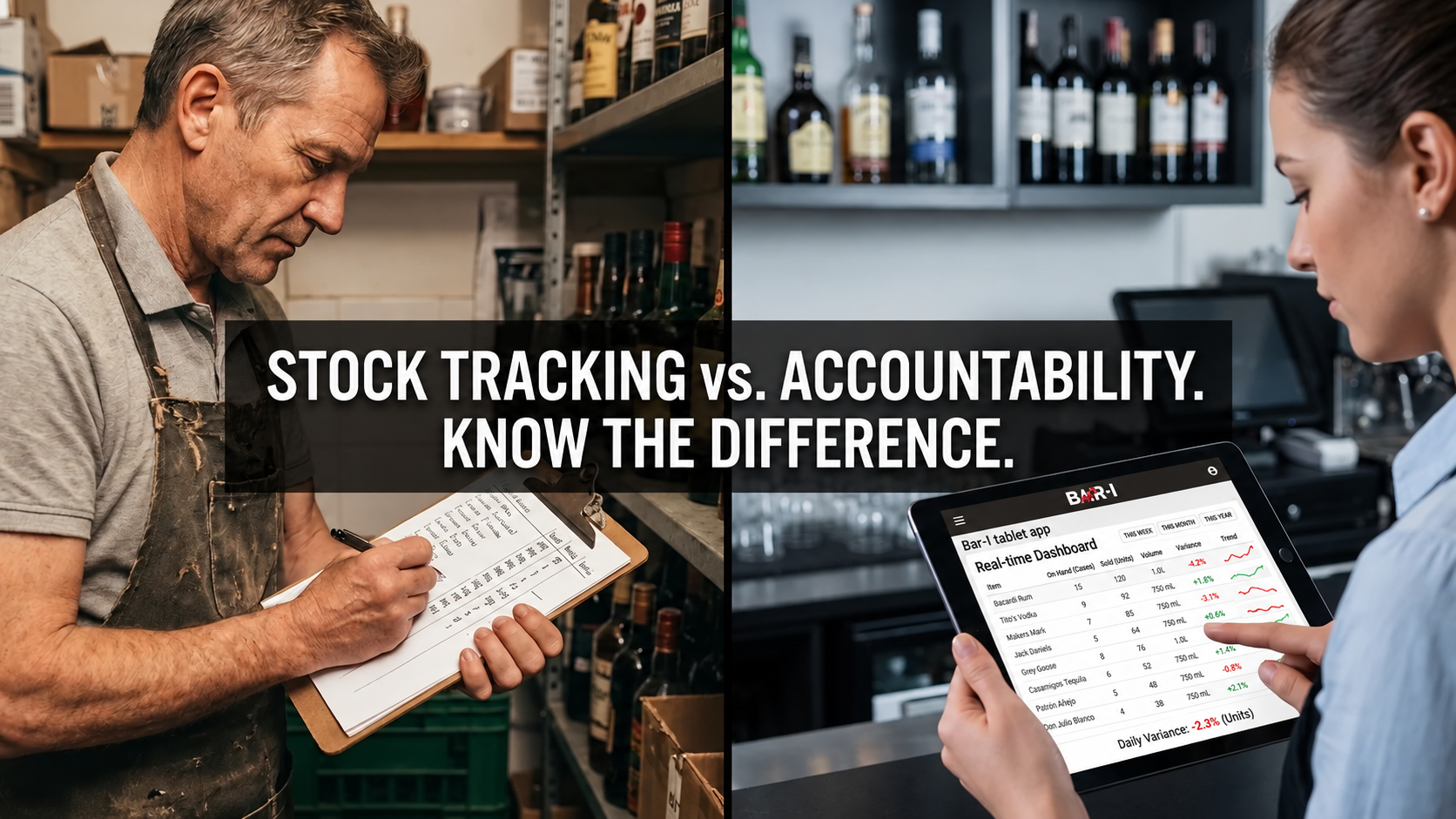
"A bar inventory tool that cannot see your POS data can tell you what you have. Only one that integrates can tell you what you're losing."
A count tells you how many bottles are left on your shelves. It cannot tell you whether what you actually used matches what you sold. Bar inventory software that integrates with your POS system closes that gap: it compares the consumption your sales say should have happened with the consumption your counts show actually happened, product by product. Stock tracking is not accountability.
Without that comparison, the difference between what you sold and what you actually consumed stays invisible. Over-pouring, unrecorded pours, theft, and recipe drift can all hide inside a single liquor cost number. With POS integration and accurate recipe mapping, that difference becomes measurable at the product level, in ounces and dollars.
This guide explains how POS-integrated bar inventory software works, how Bar-i works with Toast, Square, Clover, and Lightspeed, and why the quality of recipe mapping — not just the POS connection — determines whether your accountability data is useful.
What Does POS Integration Do for Bar Inventory Software?
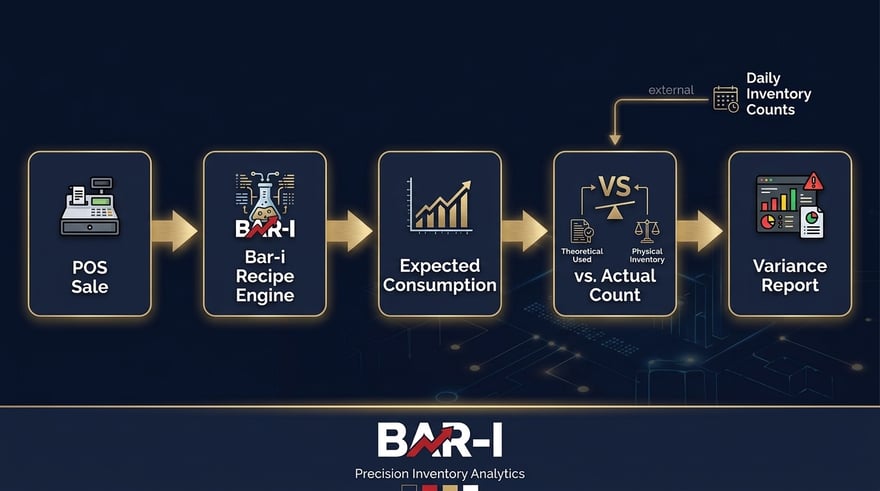
POS integration converts every sale recorded in your POS system into an expected consumption figure — a precise calculation of what should have been poured based on the recipe for each item sold. That expected number is compared against the actual measured consumption from your inventory count. The difference is your product-level variance in ounces and dollars. Without POS integration, you have stock levels. With it, you have accountability. For more on connecting the two systems, see Integrate Your POS and Inventory Systems to Maximize Profits.
Why POS Integration Matters for Liquor Cost
The fundamental shift that POS integration creates is moving from passive stock tracking to active accountability. Here is the difference in practice.
Without POS integration, you count bottles at the start and end of a period, calculate what was consumed, and compare it to purchases. You know how much you used — but not whether that usage was appropriate. A $3,000 drop in premium spirit inventory could reflect normal sales or unrecorded loss, and without sales data you cannot tell which.
With POS integration: every sale recorded in your POS system generates an expected consumption figure — down to the exact pour size specified in the recipe. If your Vodka Soda button is mapped to 1.5 oz of well vodka, every sale of that item creates a 1.5 oz expected deduction in the inventory model. After a count cycle, your actual measured consumption is compared against the accumulated expected figure. The variance — per product, per SKU — is the accountability data that drives cost reduction.
|
Pro Tip — Integration Without Recipe Mapping Is Incomplete Connecting your POS to an inventory system is step one. Step two — mapping every POS button and modifier to exact recipe ingredients and pour sizes — is what makes the data meaningful. Without mapping, the expected consumption calculation is built on assumptions, not actuals. For example, if your 'Margarita' button is mapped to a generic 1.5 oz pour but three bartenders make it with 2 oz of premium tequila, the expected consumption figure is wrong from day one — and so is every accountability report built on top of it. |
Bar-i's POS Integration: Platform by Platform
Bar-i works with Toast, Square, Clover, Lightspeed, and 40+ POS integrations in total. For each platform, Bar-i imports the itemized sales report for your count period, and the account team guides the export and verifies that the data is complete before running accountability calculations. The account team then maps each menu item and modifier to a recipe with exact pour sizes.
Toast POS
For Toast, Bar-i imports Toast's itemized Product Mix report for each count period (see how to run the Toast Product Mix report). The account team maps each Toast button and significant modifier — double pours, premium substitutions, add-ons — to a recipe with exact pour sizes, so those upsells are counted accurately. Read the full Bar-i + Toast integration guide for details.
Square POS
For Square, your team exports the Item Sales report from the Square Dashboard and uploads it to Bar-i for each count period — no API credentials or developer access are required. The account team maps every Square menu item and modifier to a recipe, including modifiers that change the pour size or ingredients. Bar-i works with your existing setup first; specific button names (naming the exact product rather than just "Shot") improve precision. See the Bar-i + Square integration guide.
Clover POS
For Clover, Bar-i imports the itemized Product Mix report from your Clover account. The account team maps each Clover button to a recipe with set pour sizes. Where one item covers several sizes, separate buttons for each size — such as a "Double" button with its own pour — improve precision. See the Bar-i + Clover integration guide.
Lightspeed Restaurant
For Lightspeed Restaurant, Bar-i imports the itemized Product Mix report for the same period as your count. The account team maps items and modifiers, including double pours and substitutions. For multi-location groups, each location has its own accountability report, and all location data is accessible through a single Bar-i login. See the Bar-i + Lightspeed integration guide.
|
Pro Tip — Review Your First Report With Your Account Manager A POS data import that succeeds does not guarantee accurate recipe mapping. Accountability data requires two counts — a starting count and an ending count — and Bar-i calculates usage between those two counts and compares it against your sales data. Review the first report with your account manager, who can spot mapping errors; trends build over the first several count cycles. |
What Bar-i's Accountability System Includes
Bar-i combines counting hardware, POS integration, and expert analysis in one service.
|
1. Bluetooth Precision Scale + Physical Barcode Scanner Open bottles are weighed on a Bluetooth precision scale to 0.1 oz, replacing visual estimation. A physical barcode scanner identifies each SKU automatically, distinguishing brands, sizes, flavours, and vintages that manual selection cannot reliably tell apart. Bar-i’s barcode counting system allows you to count 500 items an hour, providing better speed and accuracy compared to visual estimation of bottles. |
|
2. Speed Count Mobile App Guides staff through the same logical sequence every count — speed rail, front bar, back bar, storage — making counts repeatable and comparable. |
|
3. POS Integration + Recipe Mapping Works with Toast, Square, Clover, Lightspeed, and 40+ POS integrations in total. The account team maps every POS button and modifier to exact recipe pour sizes so every sale becomes an expected consumption figure. |
|
4. Expert Account Management + Dedicated Variance Reporting Bar-i assigns a trained specialist who knows your bar, your POS configuration, and your variance history. Your account manager leads live onboarding and initial setup, consults on POS programming to maximise counting precision, and processes each week’s data on your behalf. Each reporting cycle, your specialist walks your management team through a dedicated variance review — a technical, product-level analysis that identifies specific sources of loss — and delivers written action recommendations. This is expert oversight, not a self-service dashboard. |
|
5. Invoice Reconciliation Reconciles supplier invoices against received product so liquor cost calculations reflect what you actually paid — closing the common gap where wrong unit costs inflate theoretical liquor cost. |
The Liquor Cost Formula — Understanding What You're Measuring
|
FORMULA Liquor Cost % = (Cost of Liquor Sold ÷ Liquor Revenue) × 100 Achievable Liquor Cost = What your cost should be if every pour matched recipes Accountability Gap = Actual Liquor Cost % − Achievable Liquor Cost % Bar-i quantifies this gap in dollars at each count. Bar-i's published client average is a 3-percentage-point reduction in liquor cost. Illustration only (hypothetical): on $50,000/month in liquor revenue, 3 points equals $1,500/month, or $18,000/year. |
The accountability gap is what separates an acceptable liquor cost from an optimal one. A gap of even a few points, left unaddressed, is a recurring monthly loss that compounds over a year. Bar-i quantifies that gap in dollars at each count and recommends actions to narrow it.
System Comparison: Counting Tools vs. POS-Integrated Accountability
| System | Price | Hardware | Measurement |
|---|---|---|---|
| Backbar (free) | $0 | None | Manual count |
| Partender | From $199/month (yearly commitment) | None | Visual estimation |
| AccuBar | From $149/month + $500–$2,000 hardware | Scale + scanner (separate) | Weight-based |
| Bar-i | See current Bar-i pricing | Bluetooth scale + physical barcode scanner | 0.1 oz precision scale |
Bar-i also reports product-level accountability scores and cost variance in dollars, with expert analysis each reporting cycle. Competitor pricing and hardware details are from Bar-i's bar inventory software comparison; confirm current details on each vendor's site.
|
ILLUSTRATIVE EXAMPLE — HYPOTHETICAL, NOT A GUARANTEE Assumptions: $50,000/month in liquor revenue, and a 3-percentage-point improvement in liquor cost. Your results depend on your starting liquor cost, your volume, and how consistently you act on the recommendations. $50,000 × 3% = $1,500/month, or $18,000/year. Compare that figure with your own subscription and equipment cost (see Bar-i pricing) to estimate your own return. |
Which Type of System Fits Your Bar?
- If you only need stock visibility, a counting-only tool, including free options, may be enough to start.
- If you want to know whether what you poured matches what you sold, you need POS integration with accurate recipe mapping. That comparison is what produces product-level accountability.
- If you run multiple locations, each location has its own accountability reports, and all location data is accessible through a single Bar-i login.
Not sure which fits your bar? Schedule a Bar-i demo and see how your POS data would be compared against your counts.
Pro Tips for POS-Integrated Bar Inventory Management
|
Pro Tip #1 — Ask Exactly How Recipe Mapping Works Ask who builds the recipe mapping and how each button and modifier is verified. At Bar-i, the account team maps every POS button and modifier to a recipe with exact pour sizes, checking each against your actual drink specifications, so expected consumption reflects how drinks are really made. |
|
Pro Tip #2 — Use Specific Button Names and Pour Sizes Generic buttons such as "Cocktail," "Whiskey Drink," or "House Pour" reduce recipe mapping accuracy, and a generic "double" modifier is less precise than a button that names the product and the pour, such as "Double Maker's Mark 3 oz." Bar-i works with your existing setup first, then flags which generic buttons cause the most variance. See How to Program Your Bar's POS System to Maximize Profits. |
|
Pro Tip #3 — Check How Modifiers Are Handled "Add premium liquor," "double," "light pour," and similar modifiers change both the cost and the expected consumption of a drink. A modifier that swaps a well vodka for a premium vodka and increases the pour from 1.5 oz to 2 oz should be mapped as its own recipe rather than inherited from the base item. Ask any vendor how modifiers are handled before you sign. |
|
Pro Tip #4 — Update Recipe Mapping as Your Menu Evolves Seasonal cocktails, supplier changes, and menu updates can create variance that looks like shrinkage but is actually mapping drift. Each week, Bar-i compares new POS buttons against existing recipes, and unmapped buttons surface automatically — so let your account manager know when your menu changes. |
Frequently Asked Questions
What does POS integration do for bar inventory?
POS integration converts your sales data into expected consumption figures — product by product, pour by pour. Every item sold through your POS generates a precise deduction in the inventory model based on its recipe. After a count cycle, actual measured consumption is compared against that expected figure, producing a product-level variance report in ounces and dollars. This is what transforms bar inventory from stock tracking into accountability.
Does Bar-i integrate with Toast?
Yes. Bar-i imports Toast's itemized Product Mix report for each count period, and the account team maps each Toast button and significant modifier — double pours, premium substitutions, add-ons — to a recipe with exact pour sizes. See the Bar-i + Toast integration guide.
Can I use bar inventory software without POS integration?
Yes. Some inventory tools, including free options, are built mainly for counting and stock visibility and work without POS integration. They show what you have, but they cannot compare what you poured against what you sold. Without that comparison, you have no accountability data, and no ability to measure or reduce liquor cost at the product level.
How does recipe mapping work?
Recipe mapping links every item in your POS menu to its exact ingredients and pour sizes. For example, when a "Whiskey Sour" is sold, the mapping tells the system to deduct 2 oz bourbon, 0.75 oz lemon juice, and 0.5 oz simple syrup from expected inventory. Bar-i's account team builds this mapping during onboarding, reviewing every button and modifier in your POS against your actual drink specifications.
What if my POS has complex modifier structures?
Complex modifiers — where a single item can have multiple price tiers, liquor substitutions, or pour size variations — require each modifier to be mapped as a separate recipe variant. Bar-i's account manager handles this during setup. If your POS has an unusual structure, the account manager works with you directly to map it correctly before the first count cycle.
How long does the POS integration setup take?
Timing depends on your menu size and complexity. Bar-i's account team guides the export process and verifies that the data is complete before running accountability calculations. Most operators finish their first two counts within two weeks of setup. Accountability data requires two counts — a starting count and an ending count.
Which POS system integrates best with bar inventory software?
Toast, Square, Clover, and Lightspeed all work with Bar-i, among 40+ POS integrations. The quality of the results depends more on the accuracy of the recipe mapping than on the POS platform itself.
The Bottom Line
POS integration transforms bar inventory software from a counting tool into an accountability system. Without integration, you know what you have. With integration and proper recipe mapping, you know what you're losing — product by product, SKU by SKU, week by week. That difference is the difference between monitoring a problem and solving it.
Bar-i works with Toast, Square, Clover, Lightspeed, and 40+ POS integrations in total, with account-team-led recipe mapping that keeps expected consumption calculations accurate. Integration is not a feature. It is the foundation of product-level accountability.
See what the sold-versus-poured comparison looks like for your bar.
Prefer to watch first? Browse Bar-i's POS integration videos.

-1.png)